Error synchronizing outlook to exchange server

Getting the following error email in the sync log folder within Outlook connected to an Exchange 2003 server:

12:27:02 Synchronizer Version 11.0.8200

12:27:02 Synchronizing Mailbox ‘mailbox name

12:27:03 Synchronizing server changes in folder ‘Inbox

12:27:03 Downloading from server ‘exchange server name

12:27:04 17 item(s) added to offline folder

12:27:04 11 view(s)/form(s) added to offline folder

12:27:04 Error synchronizing folder

12:27:04 [8004010F-501-8004010F-0]

12:27:04 The client operation failed.

12:27:04 Microsoft Exchange Server Information Store

12:27:04 For more information on this failure, click the URL below:

12:27:04 http://www.microsoft.com/support/prodredirect/outlook2000_us.asp?err=8004010f-501-8004010f-0

12:27:04 Done

The only way around this was to redo the outlook profile – delete your email settings under Account Settings and add a new profile.

If neccessary delete the local OST file as well. This can be found at:

For Windows XP:

C:Documents and Settingsuser nameApplication DataMicrosoftOutlook

For Windows 7:

C:Usersuser nameAppDataLocalMicrosoftOutlook
 

Allowing Traceroute through a Cisco ASA firewall using ASDM

The default settings on a Cisco ASA firewall are to block all traffic including ICMP traffic which is what utilities such as Ping and Traceroute (Tracert on Windows) use.

You will just get ‘Request Timed Out’ messages unless you add an Access Rule to the Cisco ASA firewall.

Using ASDM goto Configuration and Access Rules.

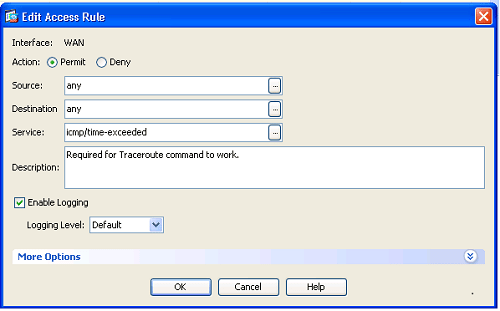
Add an Incoming Rule to the WAN section and fill in as follows:

WAN, Permit, any, any, icmp/time-exceeded

Cisco_ASA_Traceroute_Rule.png

ICMP Time-exceeded is what the Traceroute utility uses to measure response time. See Wiki article:

http://en.wikipedia.org/wiki/Traceroute


Exchange 2003 services erratic or stopped after FSMO role transfer and DC demotion

We had problems with Exchange 2003 server after transferring FSMO roles from the DC server to a different DC server and demoting the original server to a basic file server (Exchange server was completely separate i.e. not a DC).

The process of transferring FSMO roles and demotion as described in these MS articles:
http://support.microsoft.com/kb/324801

http://support.microsoft.com/kb/238369

went through without any problems but later in the day we had reports from Exchange users that they could not get email – Exchange server was acting erratically and eventually services stopped altogether.

It transpired that the Recipient Update Server (RSU) was at fault. The RUS needs to use a Global Catalog server (typically there is only one per domain). It was looking at the old server for the Global Catalog. I tried to change it to the correct server but ran into an error when trying to select the DC stating ‘The operation failed. ID no 80004005 Exchange System Manager’.

I checked there were no rogue records in AD of old DC servers using Petri’s excellent article: http://www.petri.co.il/delete_failed_dcs_from_ad.htm, but no old servers were listed.

As I could not change the RUS settings through the system manager I looked for another way to change them and found this solved the problem:

Open ADSI Edit and navigate to ConfigurationServicesMicrosoft Exchange<Organization Name>Address Lists ContainerRecipient Update Services.

On the right side, you will see the RUS links listed.

Right click on the relevant RUS and select Properties.

Where you see “Select a property to view:” select msExchServer1NetworkAddress.

You should see the current Domain Controller listed.

Click on the Clear button

Change to correct server and click Set and OK

Restart the Microsoft Exchange System Attendant Service


Windows Server Strict Naming not allowing server alias names (CNAME DNS records)

By default Microsoft Windows Server only allows clients to access it via file manager (SMB access) using the name of the server. It will not allow you to use an alias e.g. a CNAME alias setup in the DNS server records.

To rectify this follow instructions in this Microsoft article:

http://support.microsoft.com/kb/281308/en-us

This opens up all sorts of possibilities e.g. for SQL mirroring we can give servers names like SQL_Principal, SQL_Mirror, SQL_Witness rather than their actual names which means if we bring a new server online we can simply change the DNS record to the new IP of the server. Or our Exchange server has an alias of Exchange and all our Outlook clients point to Exchange on our domain rather than the actual server name – again a simple DNS change is all that is required to swap servers.

DNS Records not updating for DHCP clients

When we setup Microsoft DHCP and DNS servers we found that when client machines obtained new DHCP IP addresses on the local subnet the relevant A and PTR records were not added to the DNS server. This manifested itself when client machines could not be pinged.

Apparently the DNS records are not updated unless a client machine requests it – which does not happen when a new address is obtained.

To change this behaviour:

This is a modified configuration supported for Windows Server 2003-based DHCP servers and clients that are running Windows Server 2003, Windows 2000, or Windows XP. In this mode, the DHCP server always performs updates of the client’s FQDN and leased IP address information regardless of whether the client has requested to perform its own updates.

To configure a DHCP server to register and to update client information with its configured DNS servers, follow these steps:

  1. Open the DHCP properties for the server
  2. Click DNS, click Properties, click to select the Enable DNS dynamic updates according to the settings below check box, and then click Always dynamically update DNS A and PTR records.


Renaming MS SQL 2005 database filenames

I need to rename the filenames of a database because it did not fit in with our naming policy.

You have to detach and attach the database to rename the files – because they are open files locked by SQL server – this means the database has to be taken down for a short period.

Use the following SQL commands to achieve the rename:

Database: Testdatabase
DB Location: d:mssqldata
DB log location: e:mssqllogs
DB file name: Testdatabase.mdf
DB log file name: Testdatabase_log.ldf
New DB file name: renamedTestdatabase.mdf
New DB log file name: renamedTestdatabase_log.ldf

1. First detach the database:
EXEC sp_detach_db ‘Testdatabase’, ‘true’

2. Then rename the files – using command prompt/file explorer.

3. Lastly reattach the database:
EXEC sp_attach_db @dbname = N’Testdatabase’, @filename1 = N’d:mssqldatarenamedTestdatabase.mdf’, @filename2 = N’e:mssqllogsrenamedTestdatabase_log.ldf’

Does not print or prints strange characters when using Terminal Server/RDP Easy Print service

We recently upgraded to Windows 2008 R2 terminal services/RDP and started getting reports from Windows XP users that they could not print and were getting error messages or were getting strange characters being printed when using the new Easy Print service.

Easy Print uses the local printer drivers rather than requiring the drivers to be installed on the terminal server – very useful to admins!

To solve this make sure that .NET framework 3.5 is installed.

Made sure that youhave Version 7 of TS client installed on the XP machine.

You can download this from: http://www.microsoft.com/download/en/details.aspx?displaylang=en&id=20609
(Note: even though this is version 7 it shows up as V6.1 under the file version in XP!)

Renamed this file: c:windowssystem32TsWpfWrp.exe to TsWpfWrp_OLD.exe (this was version 3.0.6920.1109 on our XP machines) just as a backup.

Copy a Win 7 version of the file to the same location – latest version we found was 3.0.6920.1201.

This solved both the error coming up and weird characters being printed.

Uninstalling from the Command Line

If a programme is not appearing in add/remove programs goto the following registry location:

HKLMSoftwareMicrosoftWindowsCurrentversionUninstall[name of
application]ModifyPath

If there is no modify path under the applications name then check through each GUID for the programme concerned.

Copy contents to command window and change the /I for a /X if neccessary.

e.g.

MsiExec.exe /I{CDC86F04-DA60-4043-B177-B870CE081040}

The GUID is unique for each programme installed.

Change to:

MsiExec.exe /x{CDC86F04-DA60-4043-B177-B870CE081040}

This should force the programme to uninstall – you can check by seeing if the GUID entry has disappeared.

You can also use this command on any MSI install package including drivers:

e.g.

MsiExec /x ‘c:driversWin_x86_SES_Driver.MSI’


See ms article for MSIExec details:

http://technet.microsoft.com/en-us/library/cc759262(WS.10).aspx

Breakthepaywall 1.3.0 now available

BreakthePaywall! is a free add-on for Internet Explorer 7 or higher using Windows XP, Windows Vista or Windows 7 that simplifies using the various methods for circumventing website paywall restrictions.

NEW Version 1.3.0 now available! – this latest release solves the problems with Microsoft’s August 2011 update for IE which changed the way cookies are stored and also adds functionality for deleting Flash cookies and HTML5 DOM Storage. Go to the download area to install the latest version.

HTML5 Cookies – DOM Storage in IE

HTML5 cookies are the latest threat to your browser privacy.

Like ordinary cookies and Adobe Flash cookies or locally stored objects (LSO’s) they can be used to track your online browsing.

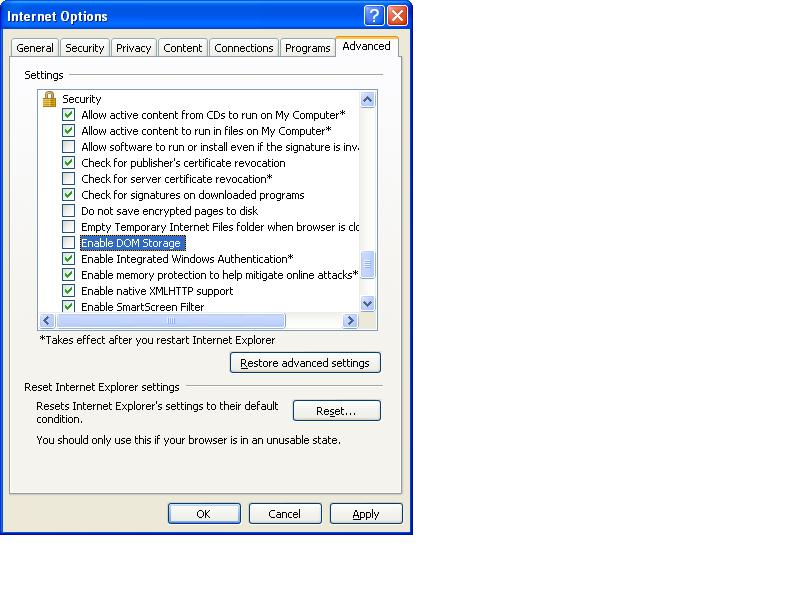
Like flash cookies (see: http://www.islandearth.com/articles/2011/7/22/how-to-block-lsos-flash-cookies.html) you can block them completely within Internet Explorer by unticking this option under Tools, Internet Options, Advanced, Security Section:

DOM_Storage.JPG

The DOM Storage folder is located at:

XP:

c:documents and settings[Username]Local SettingsApplication DataMicrosoftInternet ExplorerDOMStore

Win7:

C:Users[username]AppDataLocalLowMicrosoftInternet ExplorerDOMStore

A good site for checking DOM Storage is: http://www.quirksmode.org/html5/tests/storage.html