
After upgrading to Office 2010 we had a number of issues with Powerpoint 2010 one of which was to do with random crashing which appeared to be something to do with the graphics system (Powerpoint Graphics engine was completely rewritten for this version).
We tracked it down to hardware acceleration which has been turned on in Office 2010 to improve graphics performance.
Firstly make sure your graphics cards drivers are up to date – you obviously want to use hardware acceleration if you can!
You can disable hardware acceleration by using group policy or within Powerpoint options.
Group policy:
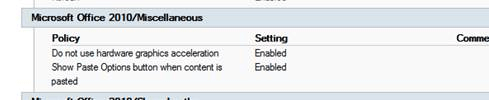
User ConfigurationPoliciesAdministrative TemplatesClassic Administrative TemplatesMicrosoft Office 2010MiscellaneousDo not use hardware graphics acceleration
Powerpoint options:
Goto File menu, Options, Advanced, Under Display section tick Disable Hardware Graphics Acceleration option
We needed activate this setting via Group Policy as this problem was particularly acute on our terminal server so it needed to be set for all users.

 IslandEarth