
When we upgraded our Windows domain servers to 2008 we found the default authentication methods had changed – PAP/SPAP was no longer enabled by default:
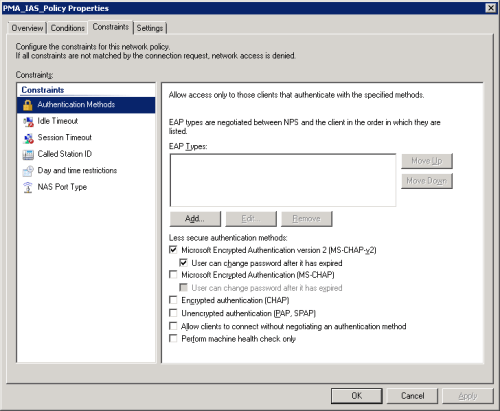
Consequently our VPN users could not connect as it turned out they were using PAP/SPAP by default.
We wanted to MS-CHAP-v2 for obvious security reasons so we needed to find out how to change our VPN tunnel groups on the Cisco ASA unit to use the stronger authentication method.
Within each tunnel group:
Configuration -> Remote Access VPN -> IPSEC (IKEv1) Connection Profiles (or whatever type of VPN you use)
Under Advanced -> Password Management
Enable the password management option:
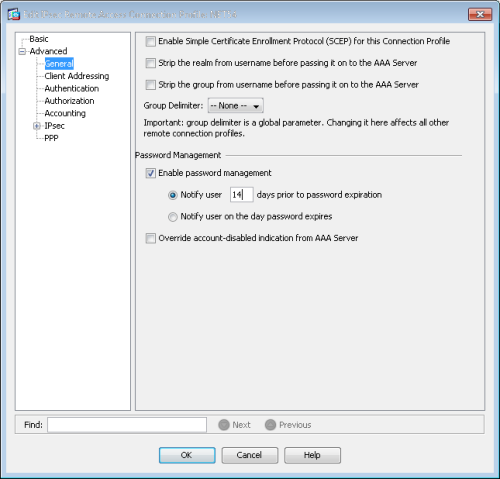
You can also set the password expiration notification here if you use that on your network – this is the Active Directory password expiration i.e. you are prompted every so often to change your network password. If you have users that are permanently on VPN connections then this can be set to warn them well before their expiration so that your IT team does not get calls regarding passwords not working 🙂
The Password Management turns on MS-CHAP-v2 for your VPN connections so you can keep your Radius servers using MS-CHAP-v2 only and ensure you are using the strongest authentication on your VPN connections.
NOTE: Once MS-CHAP-v2 is working you will notice that a extra box appears for domain in your VPN Client logon dialog box – you should enter your Windows Active Directory root domain in this box.

 IslandEarth