
The default settings on a Cisco ASA firewall are to block all traffic including ICMP traffic which is what utilities such as Ping and Traceroute (Tracert on Windows) use.
You will just get ‘Request Timed Out’ messages unless you add an Access Rule to the Cisco ASA firewall.
Using ASDM goto Configuration and Access Rules.
Add an Incoming Rule to the WAN section and fill in as follows:
WAN, Permit, any, any, icmp/time-exceeded
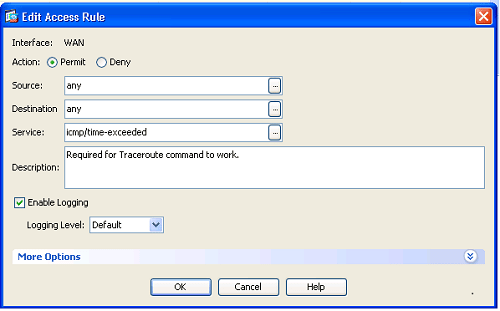
ICMP Time-exceeded is what the Traceroute utility uses to measure response time. See Wiki article:
http://en.wikipedia.org/wiki/Traceroute

 IslandEarth